
Android Device Policy
Screenshots
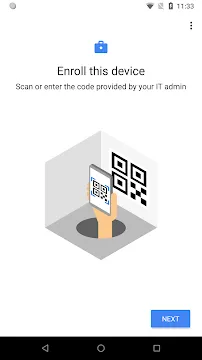
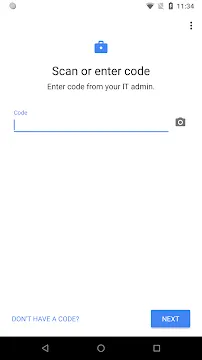

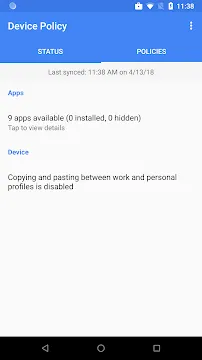
Android Device Policy helps IT administrators secure company data on mobile devices. This tool enforces security settings for organizations. Therefore, corporate information remains safe. IT professionals configure rules through the cloud. Then, the software applies these rules directly to your device.
Users can access work resources securely. This includes emails and corporate tools. Your privacy remains protected during this process. The tool separates personal data from work content. Consequently, employees feel comfortable using their own phones.
Android Device Policy coordinates with your company’s management system. It connects devices to the Android Management API. IT managers set specific password requirements. They can also manage app installations remotely. This ensures all devices meet company standards.
Security remains a top priority for businesses. Because data breaches cause heavy losses, protection is essential. Android Device Policy reduces these security risks. It allows secure access to managed Google Play. Users can quickly find approved business tools.
The setup process requires only a few steps. Users download the tool from the store. Then, they scan a unique QR code. This code links the device to the company network. Next, the system creates a secure workspace. Employees can now work from any location. This flexibility increases overall productivity. However, security boundaries stay completely intact.
What Is Android Device Policy?
Android Device Policy acts as a direct link between IT managers and mobile units. It operates in the background of your system. Google created this tool to replace older security management methods. It supports devices running modern versions of the operating system. Specifically, you need Android 6.0 or later. Older systems cannot run this modern security tool.
The tool receives instructions from an Enterprise Mobility Management provider. This provider is often called an EMM. The EMM defines the rules for your device. Then, Android Device Policy enforces those rules.
Every organization has different security needs. Some companies require very complex passwords. Other businesses want to restrict certain device features. For example, they might block camera usage. Android Device Policy makes these choices possible. It checks device status constantly. If a device lacks the proper settings, it blocks work data. This reaction protects secret corporate knowledge. It keeps hackers away from company systems.
How Android Device Policy Protects Corporate Data
Android Device Policy safeguards business files through advanced encryption. It forces the device to encrypt all storage. This action keeps files safe if someone steals the phone. Nobody can read the data without the correct password.
Additionally, IT managers can wipe the device remotely. This remote wipe removes all company data instantly. It provides peace of mind during emergencies. Lost devices no longer mean exposed corporate secrets.
The tool also monitors device compliance. Compliance means following all security rules. For instance, your admin might require a monthly password change. Android Device Policy alerts you when changes are due. It gives you time to update your settings. If you ignore the alert, the tool blocks access. You lose your connection to work emails. However, you regain access immediately after updating. This method guarantees continuous protection.
Furthermore, the tool blocks compromised hardware. It detects if a phone is rooted. Rooted phones face higher security risks. Therefore, Android Device Policy disables work profiles on rooted devices. This proactive behavior stops malware from spreading. It shields the entire corporate network from danger.
Setting Up Android Device Policy Easily
Android Device Policy offers a straightforward installation process for users. First, your IT administrator provides an enrollment token. This token can be a simple link. Alternatively, it can be a QR code. You open the camera on your phone. Then, you scan the QR code. The system recognizes the code immediately. It starts the enrollment process right away.
Next, you must accept the terms. The tool explains what data it collects. It values user transparency. Therefore, you always know what your admin can see. The setup creates a separate work section. This step takes a few minutes. Your phone might feel warm during this time. Do not cancel the process midway.
Important Note: You must have a Google Workspace or an enterprise account to complete this setup. Make sure your IT department has generated your specific login credentials before you start.
After setup completes, you see new icons. These icons represent your work apps. They feature a small briefcase symbol. The symbol tells you the app is secure. You can now log into your business accounts. Everything works smoothly from this point.
Managing Different Modes in Android Device Policy
Android Device Policy supports two primary deployment modes. The first mode is the Work Profile. This mode is perfect for personal phones. Employees use their own devices for business tasks. The tool creates an isolated workspace. Your personal photos remain private. Your personal text messages stay safe. IT managers cannot see your personal files. They only control the work workspace. This balance satisfies both parties.
The second option is the Fully Managed Device mode. Companies choose this mode for company-owned hardware. It gives administrators complete control over the device. They can manage all apps and settings. They can block personal app downloads entirely.
This mode turns the phone into a dedicated work tool. For example, delivery drivers use fully managed tablets. Hospital staff use them for patient check-ins. Both modes utilize the same secure core. Android Device Policy handles the configuration seamlessly. It adapts to the needs of your business model.
The Core Functions of Android Device Policy
Android Device Policy executes several essential tasks automatically. It handles certificate management for secure networks. This allows your device to connect to office Wi-Fi automatically. You do not need to type complex passwords. The tool installs the necessary credentials securely. Therefore, network connections remain stable and safe.
Additionally, the tool manages app updates. Security vulnerabilities appear frequently in old software. Android Device Policy forces critical updates. It ensures your work apps have the latest patches. This prevents exploits from hurting your company.
The core functions include:
- Enforces password complexity rules.
- Controls data sharing between profiles.
- Blocks unapproved app installations.
- Provides remote tracking for lost hardware.
- Configures secure virtual private networks.
These features work together to create safety. Users do not need technical knowledge. The tool does the hard work automatically.
Why Organizations Choose Android Device Policy
Android Device Policy reduces the workload for IT departments. Managing hundreds of phones manually takes too much time. This tool automates the entire distribution process. It supports zero-touch enrollment for bulk orders. Companies ship phones directly to employees. The phone configures itself upon first boot. This saves valuable time for everyone.
Furthermore, it lowers the risk of data leaks. Employees sometimes copy sensitive data by accident. They might paste it into personal chat apps. The App blocks this behavior completely. It stops data from leaving the work profile. Business secrets remain inside the secure container. Consequently, companies maintain regulatory compliance. They avoid legal trouble and financial penalties.
It also integrates perfectly with Google Workspace. If your business uses Google apps, setup is instant. The integration requires zero extra software. This simplicity makes it a popular choice. It works well for small businesses and large corporations alike.
Conclusion
Android Device Policy offers excellent security for corporate mobile environments. It bridges the gap between management and security. The tool separates personal life from professional duties. Therefore, employees maintain their privacy. At the same time, companies protect their data.
The installation process remains quick and simple. It removes the complexity from mobile device management. IT admins save time through automation. Users enjoy a seamless work experience. Security rules protect the network from modern threats. Ultimately, this tool provides essential protection for everyone. It represents a smart choice for modern businesses.